


WWDC 2026 Recap
A rundown of WWDC 2026’s three big themes: platform improvements, parental controls, and Apple Intelligence, with a closer look at what’s new for developers in Xcode 27. By Josh Steele.
Other nice additions throughout the OSes
Don’t worry! Some of the other areas of the OSes got some attention this year as well:
SwiftUI Updates
SwiftUI can now handle reordering collections with a new pair of modifiers – reorderable() and recorderContainer(for:). You now have finer control over toolbar placement, including what goes into the overflow menu, as well as pinning important tab bar items. This can be seen in What’s New in SwiftUI.
//Items can now be forced into the overflow menu, or pinned
ParkView()
    .toolbar {
        ToolbarItemGroup {
            UndoButton()
            RedoButton()
        }
        .visibilityPriority(.high)
        ToolbarOverflowMenu {
            ChoosePhotoButton()
            ExportAsImageButton()
        }
        ToolbarItem(placement: .topBarPinnedTrailing) {
            ShareButton()
        }
    }
SwiftData Updates
SwiftData can now section your fetches with a new sectionBy parameter when building queries, as seen in What’s New in SwiftData.
struct ParkListView: View {
		//section the results by the park's state
    @Query(sort: \Park.startDate,
           sectionBy: \.state)
    var parks: [Park]

    var body: some View: {
        List(selection: $selection) {
            ForEach(_parks.sections) {section in
                Section(section.id) {
                    ForEach(parks) {park in
                        ParkItem(park: park)
                    }
               }
            }
        }
    }
}
Swift Updates
Swift has a lot of improvements under the hood, as well as some nice additions for programmers. Two of my favorites are the addition of the anyAppleOS availability check, and the addition of module selectors (::), similar to other languages. These and a lot more can be seen in What’s New in Swift.
//mark availability starting with all 27 OSes
@available(anyAppleOS 27, *)
Xcode 27 Updates
In addition to the agents discussed earlier, Xcode has received some nice updates as well. It is now more customizable with additional themes and a customizable toolbar, and you can get started with projects quicker than ever before.
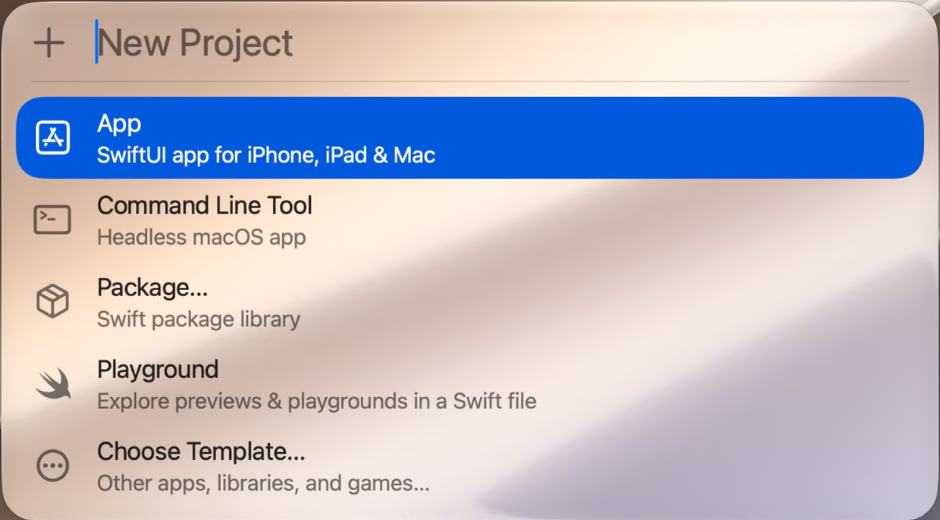
When making a new project from the File > New Project menu, a Spotlight-like dialog opens up so you can choose the type, and then, like most other apps on macOS you’re brought right into the project. No need to set a title, whether you’re using SwiftData, or other details. Once you’re ready you can save and set those features.
The new Device Hub, which replaces the simulator, gives you a new way to interact with simulators and real devices (very similar to iPhone Mirroring), and you can easily resize the hub. This could let you check out some very different aspect ratios, “folding” those into your usual layout checks.
These changes and the updates related to agents are discussed in What’s New in Xcode 27.
More Videos Available!
Depending on where your focus is, there may be videos out there for you, so start up the Developer App and take a look!
Conclusion
I’ll admit, after watching the keynote, I was really concerned about how many videos we’d see for this year’s WWDC! As usual, Apple provided a large number of easy to digest videos (more Code Alongs please!), with a heavy emphasis on features centered around AI. Just because I’ve been watching videos every chance I get doesn’t mean that you have to! As always, remember that you don’t have to watch them all, and when you do, pace yourself. Get up, take a break, and stay hydrated. The videos will be there when you get done. Focus on what you need to support features in your app, and you’ll be set!