UI Integration & Testing
Heads up... You’re accessing parts of this content for free, with some sections shown as text.
Heads up... You’re accessing parts of this content for free, with some sections shown as text.
Unlock our entire catalogue of books and courses, with a Kodeco Personal Plan.
Unlock now
In this segment, you’ll connect your camera and image processing components to the task creation UI. You’ll add buttons for capturing photos and applying filters, then test the complete flow from camera capture to filtered display.
The UI layer orchestrates the entire process, calling Android camera APIs and Swift image processing functions through the repositories you created.
Updating the Task Model for Photo Storage
Before adding photo capture to the UI, you need to update the Swift Task model to support storing photo URIs.
public struct Task: Codable {
  public let id: String
  public let title: String
  public let description: String
  public let priority: Priority
  public var isCompleted: Bool
  // 1
  public let photoUri: String?

  // 2
  public init(
    id: String,
    title: String,
    description: String,
    priority: Priority,
    isCompleted: Bool = false,
    photoUri: String? = nil
  ) {
    self.id = id
    self.title = title
    self.description = description
    self.priority = priority
    self.isCompleted = isCompleted
    // 3
    self.photoUri = photoUri
  }
}
Updating the Task Repository
Now that the Task model supports photo URIs, you need to update the repository to accept and pass this data when creating tasks.
import java.util.Optional
// 1
fun addTask(
  title: String,
  description: String,
  priority: Priority,
  photoUri: String? = null
): Result<Unit> {
  // 2
  if (!TaskValidator.validateTitle(title)) {
    return Result.failure(Exception("Title must be between 3 and 50 characters"))
  }

  if (!TaskValidator.validateDescription(description)) {
    return Result.failure(Exception("Description must be between 10 and 200 characters"))
  }

  // 3
  val task = Task.init(
    UUID.randomUUID().toString(),
    title,
    description,
    priority,
    false,
    Optional.ofNullable(photoUri),
    arena
  )

  // 4
  _tasks.value += task
  return Result.success(Unit)
}
Updating the Create Task Dialog
Now you’ll integrate photo capture, preview, and filtering into the task creation dialog. This requires adding state management, camera integration, filter buttons, and helper functions.
package com.kodeco.android.swiftsdkforandroid.taskmanager.ui

import android.content.Context
import android.graphics.Bitmap
import android.graphics.BitmapFactory
import android.net.Uri
import androidx.exifinterface.media.ExifInterface
import androidx.compose.foundation.horizontalScroll
import androidx.compose.foundation.layout.*
import androidx.compose.foundation.rememberScrollState
import androidx.compose.material.icons.Icons
import androidx.compose.material.icons.filled.CameraAlt
import androidx.compose.material3.*
import androidx.compose.runtime.*
import androidx.compose.ui.Alignment
import androidx.compose.ui.Modifier
import androidx.compose.ui.layout.ContentScale
import androidx.compose.ui.platform.LocalContext
import androidx.compose.ui.res.stringResource
import androidx.compose.ui.unit.dp
import coil.compose.AsyncImage
import com.kodeco.android.swiftsdkforandroid.taskmanager.R
import com.kodeco.android.taskmanagerkit.Priority
import org.swift.swiftkit.core.SwiftArena
import com.kodeco.android.swiftsdkforandroid.taskmanager.repository.ImageProcessingRepository
import com.kodeco.android.swiftsdkforandroid.taskmanager.repository.TaskRepository
import kotlinx.coroutines.Dispatchers
import kotlinx.coroutines.launch
import kotlinx.coroutines.withContext
import java.io.File
import java.io.FileOutputStream


@OptIn(ExperimentalMaterial3Api::class)
@Composable
fun CreateTaskDialog(
  onDismiss: () -> Unit
) {
  val arena = remember { SwiftArena.ofConfined() }

  var title by remember { mutableStateOf("") }
  var description by remember { mutableStateOf("") }
  var priority by remember { mutableStateOf(Priority.medium(arena)) }
  var expanded by remember { mutableStateOf(false) }
  var errorMessage by remember { mutableStateOf<String?>(null) }
  // 1
  var photoUri by remember { mutableStateOf<Uri?>(null) }
  var showCamera by remember { mutableStateOf(false) }
  // 2
  var originalBitmap by remember { mutableStateOf<Bitmap?>(null) }
  var displayedBitmap by remember { mutableStateOf<Bitmap?>(null) }
  var isProcessing by remember { mutableStateOf(false) }

  val coroutineScope = rememberCoroutineScope()
  val context = LocalContext.current


  val priorities = remember(arena) {
    listOf(
      Priority.low(arena),
      Priority.medium(arena),
      Priority.high(arena)
    )
  }

  // 3
  if (showCamera) {
    CameraPermissionHandler(
      onPermissionGranted = {
        CameraScreen(
          onPhotoCaptured = { uri ->
            photoUri = uri
            // 4
            originalBitmap = loadBitmapFromUri(context, uri)
            displayedBitmap = originalBitmap
            showCamera = false
          },
          onDismiss = {
            showCamera = false
          }
        )
      },
      onPermissionDenied = {
        showCamera = false
      }
    )
    return
  }


  AlertDialog(
    onDismissRequest = onDismiss,
    title = {
      Text(text = stringResource(R.string.add_task))
    },
    text = {
      Column(
        modifier = Modifier
          .fillMaxWidth()
          .padding(vertical = 8.dp),
        verticalArrangement = Arrangement.spacedBy(12.dp)
      ) {
        OutlinedTextField(
          value = title,
          onValueChange = { title = it },
          label = { Text(stringResource(R.string.task_title)) },
          modifier = Modifier.fillMaxWidth(),
          singleLine = true
        )

        OutlinedTextField(
          value = description,
          onValueChange = { description = it },
          label = { Text(stringResource(R.string.task_description)) },
          modifier = Modifier.fillMaxWidth(),
          minLines = 3,
          maxLines = 5
        )

        ExposedDropdownMenuBox(
          expanded = expanded,
          onExpandedChange = { expanded = !expanded }
        ) {
          OutlinedTextField(
            value = priority.rawValue,
            onValueChange = {},
            readOnly = true,
            label = { Text(stringResource(R.string.task_priority)) },
            trailingIcon = { ExposedDropdownMenuDefaults.TrailingIcon(expanded = expanded) },
            modifier = Modifier
              .menuAnchor(MenuAnchorType.PrimaryNotEditable)
              .fillMaxWidth()
          )

          ExposedDropdownMenu(
            expanded = expanded,
            onDismissRequest = { expanded = false }
          ) {
            priorities.forEach { option ->
              DropdownMenuItem(
                text = { Text(option.rawValue) },
                onClick = {
                  priority = option
                  expanded = false
                }
              )
            }
          }
        }

        // 5
        Button(
          onClick = { showCamera = true },
          modifier = Modifier.fillMaxWidth()
        ) {
          Icon(
            imageVector = Icons.Default.CameraAlt,
            contentDescription = null,
            modifier = Modifier.padding(end = 8.dp)
          )
          Text("Add Photo")
        }

        // 6
        displayedBitmap?.let { bitmap ->
          AsyncImage(
            model = bitmap,
            contentDescription = "Task photo preview",
            modifier = Modifier
              .fillMaxWidth()
              .height(150.dp),
            contentScale = ContentScale.Crop
          )

          if (isProcessing) {
            Text(
              text = "Processing...",
              style = MaterialTheme.typography.bodySmall,
              modifier = Modifier.padding(vertical = 4.dp)
            )
          }

          // 7
          Row(
            modifier = Modifier
              .fillMaxWidth()
              .horizontalScroll(rememberScrollState()),
            horizontalArrangement = Arrangement.spacedBy(8.dp)
          ) {
            // 8
            Button(
              onClick = {
                displayedBitmap = originalBitmap
              }
            ) {
              Text("Original")
            }

            // 9
            Button(
              onClick = {
                originalBitmap?.let { original ->
                  isProcessing = true
                  coroutineScope.launch {
                    val result = withContext(Dispatchers.Default) {
                      ImageProcessingRepository.applyFilter(
                        original,
                        ImageProcessingRepository.FilterType.GRAYSCALE,
                        context
                      )
                    }
                    displayedBitmap = result
                    isProcessing = false
                  }
                }
              },
              enabled = !isProcessing
            ) {
              Text("Grayscale")
            }

            // 10
            Button(
              onClick = {
                originalBitmap?.let { original ->
                  isProcessing = true
                  coroutineScope.launch {
                    val result = withContext(Dispatchers.Default) {
                      ImageProcessingRepository.applyFilter(
                        original,
                        ImageProcessingRepository.FilterType.BLUR,
                        context
                      )
                    }
                    displayedBitmap = result
                    isProcessing = false
                  }
                }
              },
              enabled = !isProcessing
            ) {
              Text("Blur")
            }

            // 11
            Button(
              onClick = {
                originalBitmap?.let { original ->
                  isProcessing = true
                  coroutineScope.launch {
                    val result = withContext(Dispatchers.Default) {
                      ImageProcessingRepository.applyFilter(
                        original,
                        ImageProcessingRepository.FilterType.BRIGHTER,
                        context
                      )
                    }
                    displayedBitmap = result
                    isProcessing = false
                  }
                }
              },
              enabled = !isProcessing
            ) {
              Text("Brighter")
            }

            // 12
            Button(
              onClick = {
                originalBitmap?.let { original ->
                  isProcessing = true
                  coroutineScope.launch {
                    val result = withContext(Dispatchers.Default) {
                      ImageProcessingRepository.applyFilter(
                        original,
                        ImageProcessingRepository.FilterType.DARKER,
                        context
                      )
                    }
                    displayedBitmap = result
                    isProcessing = false
                  }
                }
              },
              enabled = !isProcessing
            ) {
              Text("Darker")
            }
          }
        }


        errorMessage?.let { error ->
          Text(
            text = error,
            color = MaterialTheme.colorScheme.error,
            style = MaterialTheme.typography.bodySmall
          )
        }
      }
    },
    confirmButton = {
      Button(
        onClick = {
          // 13
          val finalUri = if (displayedBitmap != null && displayedBitmap != originalBitmap) {
            saveBitmapAndGetUri(context, displayedBitmap!!)
          } else {
            photoUri
          }

          // 14
          val result = TaskRepository.addTask(
            title = title,
            description = description,
            priority = priority,
            photoUri = finalUri?.toString()
          )

          result.onSuccess {
            onDismiss()
          }.onFailure { error ->
            errorMessage = error.message ?: "Validation failed"
          }
        }
      ) {
        Text(stringResource(R.string.save))
      }
    },
    dismissButton = {
      TextButton(onClick = onDismiss) {
        Text(stringResource(R.string.cancel))
      }
    }
  )
}

// 15
private fun loadBitmapFromUri(context: Context, uri: Uri): Bitmap? {
  return try {
    // 15a
    val bitmap = context.contentResolver.openInputStream(uri)?.use { inputStream ->
      BitmapFactory.decodeStream(inputStream)
    } ?: return null

    // 15b
    correctBitmapOrientation(context, uri, bitmap)
  } catch (e: Exception) {
    e.printStackTrace()
    null
  }
}

// 16
private fun correctBitmapOrientation(context: Context, uri: Uri, bitmap: Bitmap): Bitmap {
  return try {
    context.contentResolver.openInputStream(uri)?.use { inputStream ->
      // 16a
      val exif = ExifInterface(inputStream)
      val orientation = exif.getAttributeInt(
        ExifInterface.TAG_ORIENTATION,
        ExifInterface.ORIENTATION_NORMAL
      )

      // 16b
      when (orientation) {
        ExifInterface.ORIENTATION_ROTATE_90 -> rotateBitmap(bitmap, 90f)
        ExifInterface.ORIENTATION_ROTATE_180 -> rotateBitmap(bitmap, 180f)
        ExifInterface.ORIENTATION_ROTATE_270 -> rotateBitmap(bitmap, 270f)
        else -> bitmap
      }
    } ?: bitmap
  } catch (e: Exception) {
    e.printStackTrace()
    bitmap
  }
}

// 17
private fun rotateBitmap(bitmap: Bitmap, degrees: Float): Bitmap {
  val matrix = android.graphics.Matrix()
  matrix.postRotate(degrees)
  return Bitmap.createBitmap(bitmap, 0, 0, bitmap.width, bitmap.height, matrix, true)
}

// 18
private fun saveBitmapAndGetUri(context: Context, bitmap: Bitmap): Uri? {
  return try {
    val photoDir = context.getExternalFilesDir("photos") ?: return null
    val file = File(photoDir, "FILTERED_${System.currentTimeMillis()}.jpg")

    FileOutputStream(file).use { out ->
      bitmap.compress(Bitmap.CompressFormat.JPEG, 90, out)
    }

    Uri.fromFile(file)
  } catch (e: Exception) {
    e.printStackTrace()
    null
  }
}
Testing the Complete Flow
You can now verify that everything works correctly.
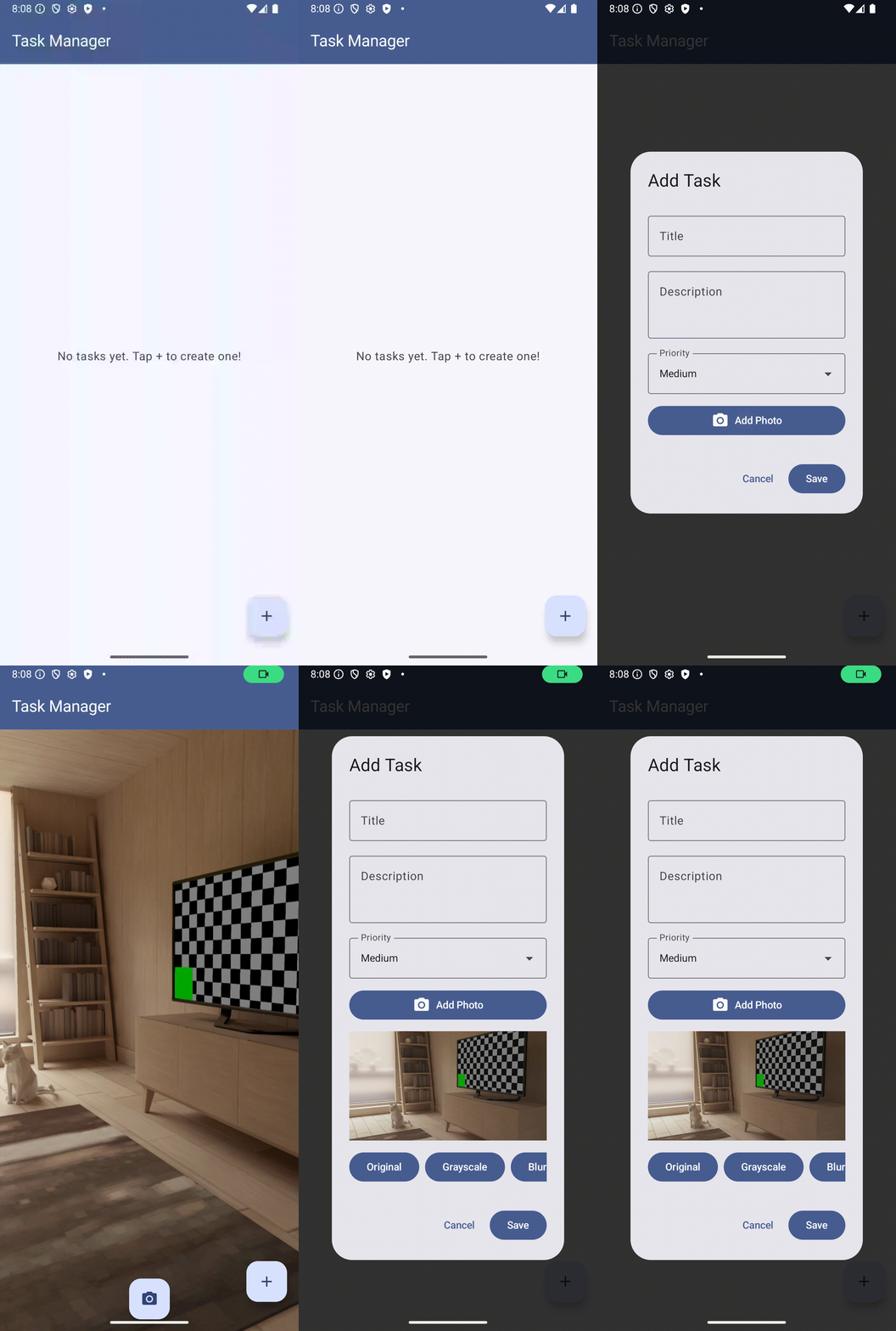
Test Case 1: Camera Capture
- Open the app and tap the floating action button.
- In the Add Task dialog, tap the “Add Photo” button.
- Grant camera permission when prompted.
- See the camera preview screen.
- Tap the capture button.
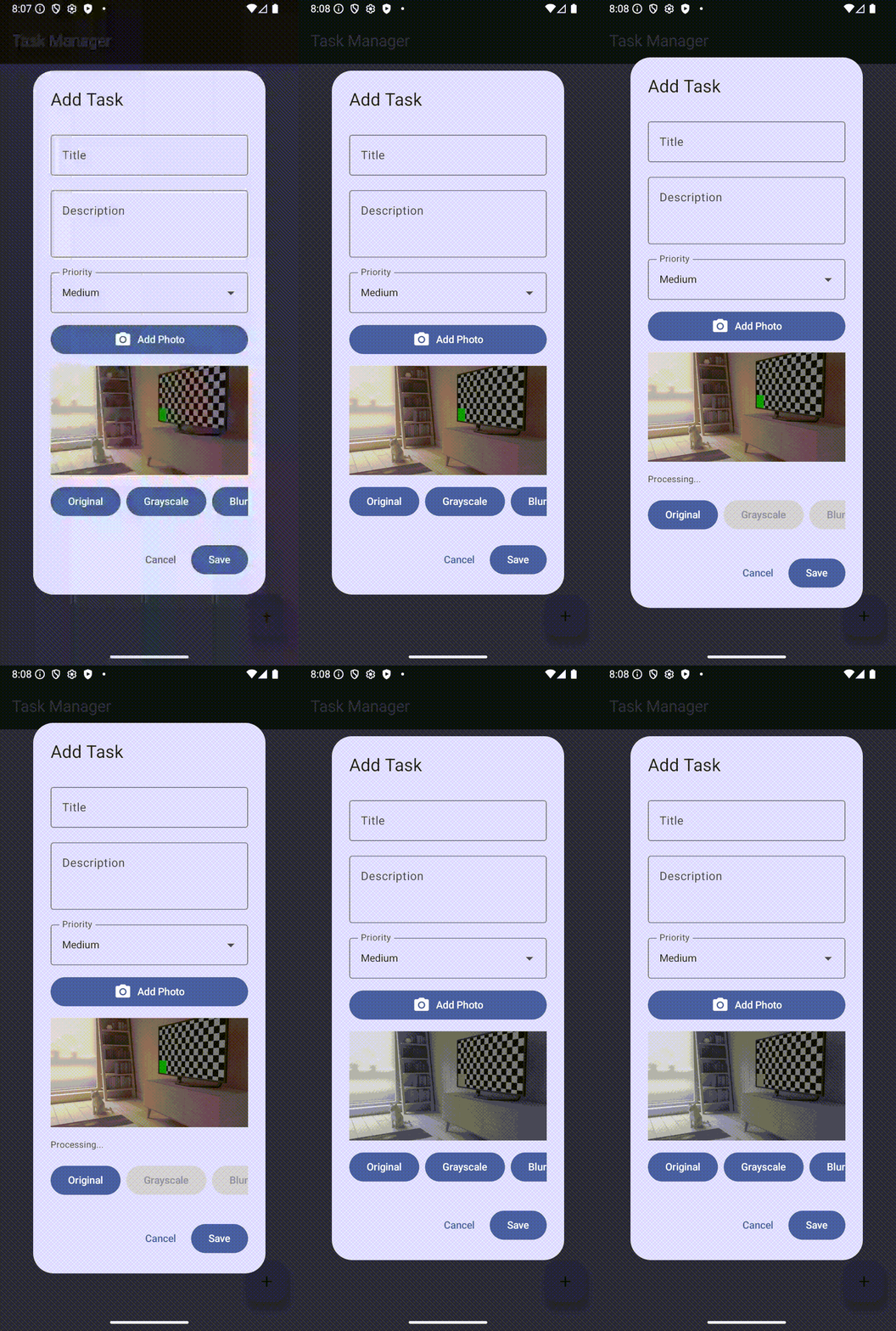
Test Case 2: Grayscale Filter
- With a photo captured, tap the “Grayscale” button.
- Wait for processing to complete.
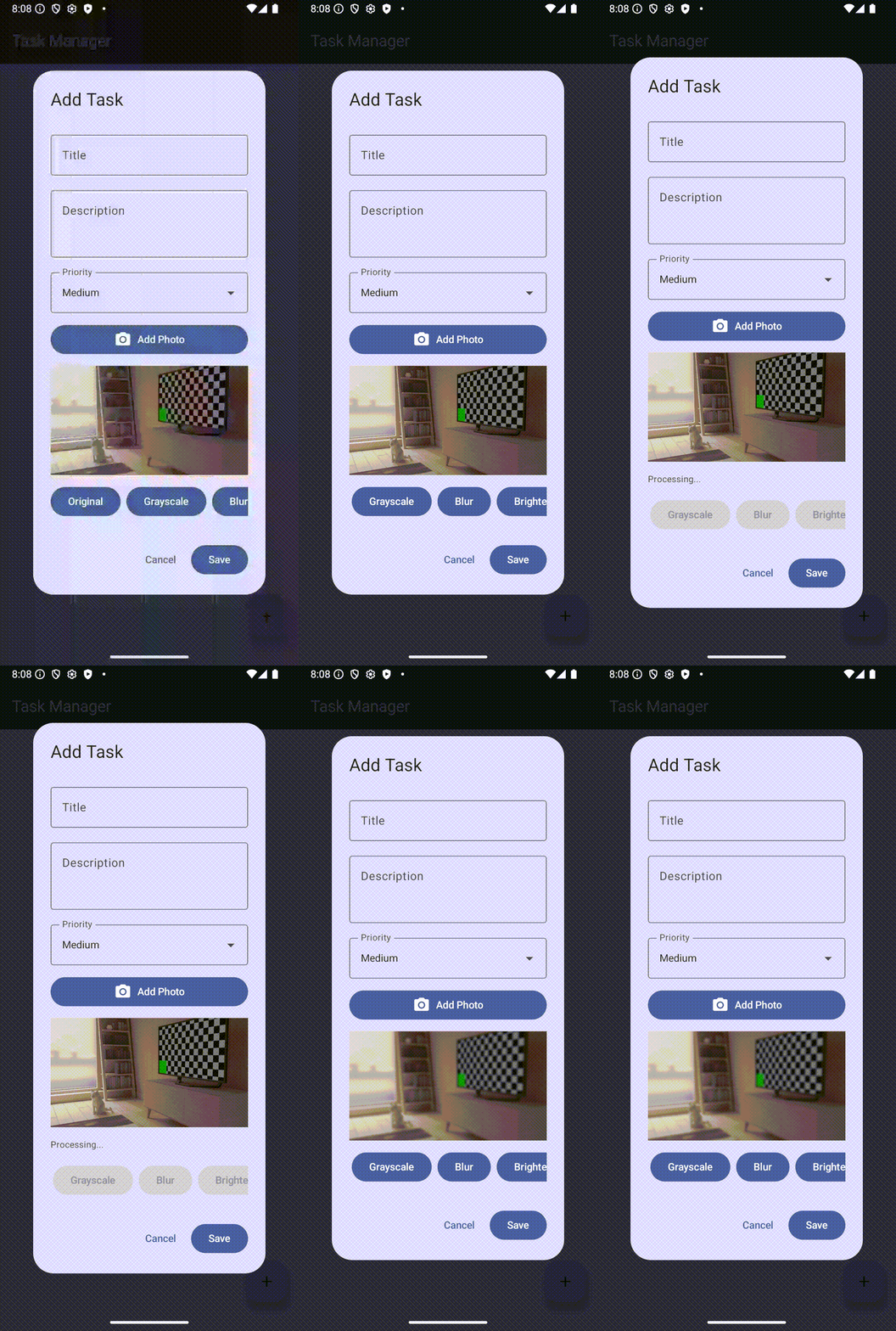
Test Case 3: Blur Filter
- Tap the “Original” button to reset the photo.
- Tap the “Blur” button.
- Wait for processing (this takes longer than other filters).
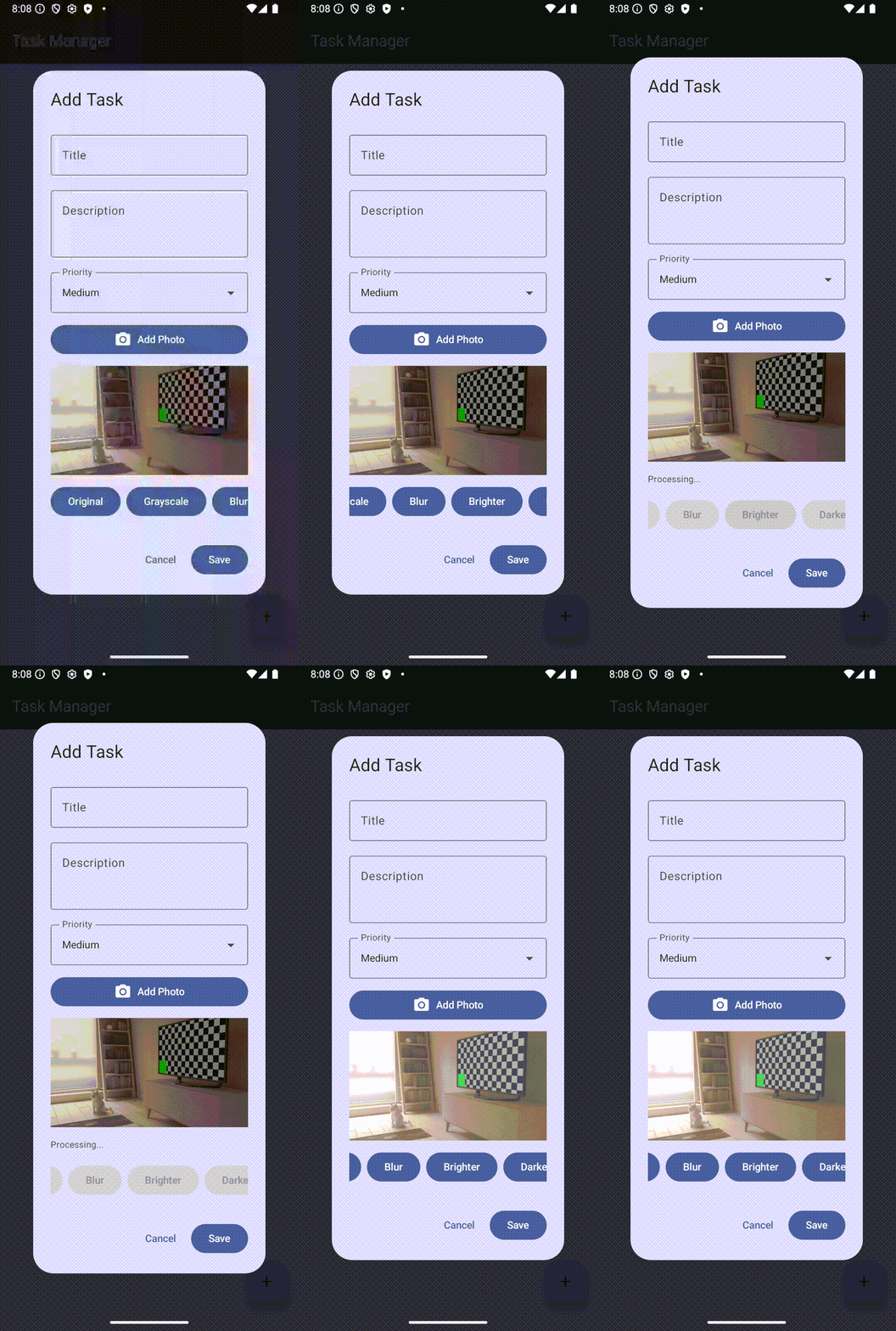
Test Case 4: Brightness Filters
- Tap “Brighter”.
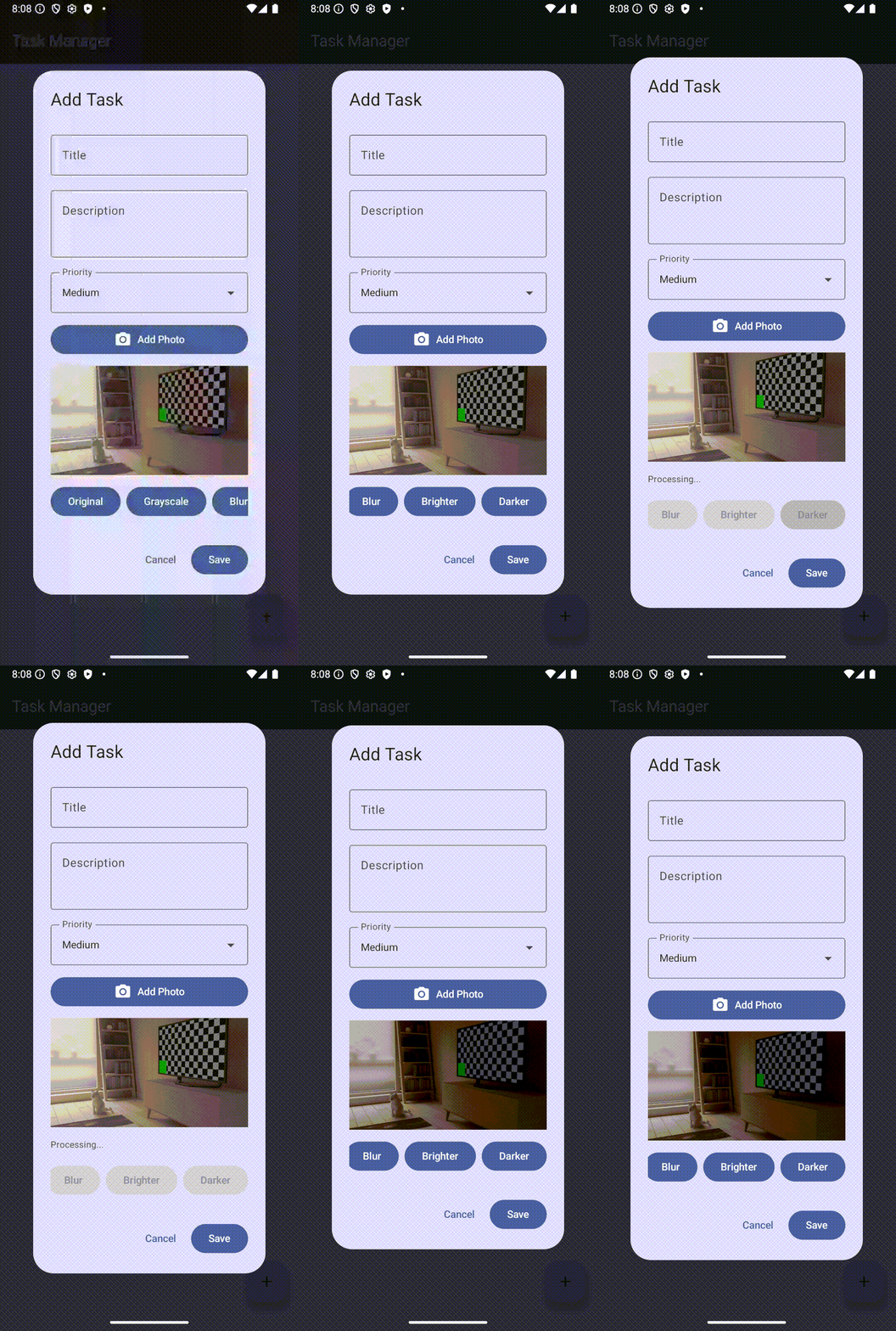
Test Case 5: Creating the Task
- Fill in title and description.
- Apply your preferred filter.
- Tap “Save”.
Updating the Task Card
To display photos in the task list, you need to update TaskCard.kt to show the task’s photo when one exists.
Text(
  text = task.description,
  style = MaterialTheme.typography.bodyMedium,
  color = MaterialTheme.colorScheme.onSurfaceVariant
)

// 1
if (task.photoUri.isPresent) {
  val uri = task.photoUri.get()
  Spacer(modifier = Modifier.height(12.dp))

  AsyncImage(
    model = uri,
    contentDescription = "Task photo",
    modifier = Modifier
      .fillMaxWidth()
      .height(200.dp),
    contentScale = ContentScale.Crop
  )
}

Spacer(modifier = Modifier.height(12.dp))

PriorityBadge(priority = task.getPriority(arena).rawValue)
import androidx.compose.ui.layout.ContentScale
import coil.compose.AsyncImage
Common Issues and Solutions
Issue: Camera permission denied. Solution: Go to device Settings > Apps > Task Manager > Permissions and grant camera access manually.
Performance Considerations
Image processing is computationally expensive. Here’s what you’re doing to manage performance:
Key Takeaways
In this segment, you’ve:
Where to Go From Here?
Congratulations on completing the UI integration for your photo-enabled Task Manager! You’ve successfully built a complete feature that spans Android’s camera APIs, custom binary data formats, Swift image processing algorithms, and a polished Compose UI.
What’s Next
Your Task Manager currently stores tasks in memory, which means they disappear when the app closes. In Lesson 3: Data Persistence and Testing, you’ll add permanent storage and comprehensive testing to create a production-ready application.